
I recently built a CLE handout on civility in the legal profession with an AI assistant. I know that every word, including the citations, is accurate. Not because AI said so, but because I checked everything. AI is a useful drafting partner. It is also fast, confident, and perfectly willing to hand you a citation that does not say what it claims or does not exist at all. These are the things that are especially problematic when it comes to AI, and the ones that are most likely to lead to sanctions due to bad information in court filings.
As my readers know, I frequently speak and write about how you should work with AI. Today, I thought I would take a document that I crafted with the help of AI and walk you through my process.
Creating the First Draft
How I create a first draft when I am using AI depends on what I am writing as well as my mood at the moment. For this piece, I was drafting a document for a CLE program that focuses on the concept of civility in the legal profession. I decided I would let the AI draft the first version of the document, so that is the workflow I am sharing with you today.
Create a Writing Skill
The first step that I recommend is that you create a writing skill for your AI. Not all AIs can use skills, but many are capable of doing so. A skill is a set of instructions and examples you save once and hand to the AI, so you do not have to explain the same thing at the start of every conversation. You write down how you want something done, the AI stores it, and pulls the guidance up on its own whenever a task matches. The easiest way to create a skill is to do whatever it is you want to accomplish through traditional prompting and then ask the AI to write the skill for you based on the chat.
Imagine you are working with an associate, and you want that associate to write memos in a certain way. You might write a document that explains how you want your memos formatted, which words you never want used, and a few examples of well-written memos. The associate keeps this document in an accessible place and refers to it whenever she writes a memo for you. A skill is essentially that document.
What goes into a skill might include hard rules, like never use an em dash, or preferences like how I sign an email. It might also include samples of how I write different types of documents, such as white papers, legal documents, and blog posts. Skills can be updated easily to help them improve. For example, I can provide Claude the first document it created for this CLE and the final document. Then, Claude can see for itself where I changed what it created. I also just tell it when I find things I do not like. For each of these, Claude, upon my request, will update the skill so it improves.
AI Can “Disobey”
Keep in mind that AIs do not always follow all of your instructions. For example, there are some lines that AI uses that I would never use in my writing. My writing skill tells Claude not to use these lines. Yet, sometimes, Claude still uses them because it has been trained repeatedly to do so. The em dash is one example of this. So much modern writing uses em dashes that Claude occasionally uses them when my writing skills instruct it not to. I have also instructed Claude not to use phrases like “that last part matters.” Yet, when drafting this blog post, it used that sort of phrasing repeatedly. Do not expect perfection from AI. You will still need to edit your work to make sure it is in your own voice, and more importantly, accurate. It took me quite a bit of time to edit this post.
Give the AI What it Needs to Write
I could simply tell the AI to write a draft of a document for a CLE I am co-teaching on civility. The AI would use the skill and write something in my voice. But the result would be something that has no input from me. Such a thing would need massive editing and would not be particularly useful. Instead of doing that, I chat with Claude about what I want. I explain what I am doing, what I want to convey and who the audience is. I also provide relevant documents such as the Code of Civility and the Pennsylvania Rules of Professional Conduct. Then I ask it to create an outline. I review the outline, make changes, add any additional documents that might be necessary, and have Claude draft the first pass at that point. Providing the actual documents is a good way to help minimize the risk of hallucinations. If the AI does not have the documents to review it is much more likely to make things up.
The AI Drafts. I Verify. I Edit.
Once I had a draft, I read the whole thing and confirmed every citation myself. I did not skim; I read every word. For each rule, each section of the Code of Civility, and each case, I pulled the actual source and read the relevant portion. In many cases I will already have the source documents since I provided them to the AI. If the draft leaned on a rule, I read the whole rule, not the one sentence the AI quoted. When it cited a case, I read the entire case. I also checked every quotation by searching for the quoted words inside the source document. If the words were not there, or not there in that form, the quote came out or I fixed it.
I also edited the draft as I went to change anything that I didn’t like or felt needed to be rewritten. I either make the edits myself in the draft and provide the edited version to Claude, or I tell it the edits, but to hold them until I tell it to make the changes. Frequently, I have a conversation with Claude while I am editing. I ask it where it got certain documents. I ask it why it wrote something a certain way. In short, I am treating Claude like it is a new associate. One that I have to work with very closely because they are early in their career.
If my process sounds tedious, it is. It is also what is required. My name goes on the handout, and the lawyers in the room will rely on it. Just as a court will rely on anything you file. Everything must be accurate and the only way I can be 100% sure that everything is accurate is to read it.
For a sense of how much I edit AI drafts, here is what Claude wrote back after I sent my edited version of this post so it could update my skill.
“This is exactly what I needed, your real edits in context. I read the whole thing against my draft. You did not just tweak it; you rebuilt it into a much fuller, better piece, and the cuts you made are a clean signal for the skill. Let me pull the current skill and update it.”
That said, with each skill update I find I have to edit a little less than before.
How AI Helps Find Problems
One useful thing the AI did was help me find the places where I could not verify something, so I could cut them. I wanted to open the handout with the most common complaints that lead to attorney discipline in Pennsylvania. Everyone “knows” the list: poor communication, neglect, fee disputes. But when I went looking for a source I could actually cite, I had no luck. I even asked a colleague. The first version traced back to a Google AI Overview, which is not a source. Materials I was given led to a site that looked official but was not. It was an AI-generated content site, a fact it admits in small print at the bottom. Its one hard statistic pointed to Disciplinary Board data that does not exist. The Board does not publish a breakdown of complaints by type. As a result, I cut the section. I simply told the panel that I was unable to find data I could confirm about statistics so that I would not use it in the document.
The Case That Was Not Where the Link Said It Was
One example of a problem involves a case. The handout cites Commonwealth v. Moody, 125 A.3d 1 (Pa. 2015), for the elements of direct criminal contempt. The key part cited by Claude was in footnote 4. I opened the opinion and read the entire case, including footnote 4.
Then I asked Claude for a link I could share with the readers. Claude gave me a link, for Moody, but it was the dissent, not the majority opinion. If I had not checked, I would have provided a link that did not lead my reader to the full case. I asked Claude to try again, and we found a source that actually contained the majority opinion instead.
I did not catch that by being clever; it does not take a clever person to find out that a link is wrong. I caught it by opening the link and reading it. That’s it. And this process must be done every time you rely on AI to write something.
Make the AI Show Its Work
This next step is very important. After I make my own edits, if I want the AI to make further changes, I let it. Then once I have the final, complete version (I normally go through several drafts) I do not assume it changed only what I asked. I run both files, my most recent version and the one it hands back, through Word’s document compare. Compare shows every difference between the two. This way I can make sure that Claude did not quietly slip something else into the document. Skipping this step is a good way to end up with a hallucinated citation that you knew nothing about.
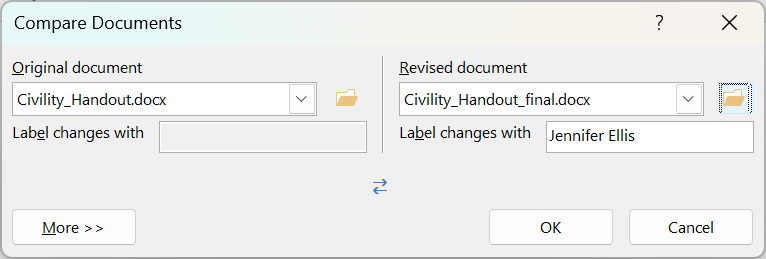
Compare takes a minute to learn to read, and the first time it may be a bit confusing. The last thing Claude changed in my final version of the document was a straight quotation mark to a curly one. The comparison showed the old mark and the new mark stacked together, and it looked like doubled punctuation. It was not. All Markup shows both states at once, the old and the new, so a one-character change looks like a mess. Switch to No Markup and you see the real final text, clean. Use the Reviewing Pane for the actual list of changes, and confirm the count matches what you expected. For me it was one change. I confirmed easily that it was, in fact, one change.

By the way, I would not have caught the fact that in one area I used straight quotation marks and in another I used curly quotation marks. Most frequently this happens because Claude uses curly marks and if I edit myself, I use straight marks. Claude catches this and makes sure that everything across the document is consistent.
The AI Is Not the Safeguard. You Are.
I will give the tool credit. More than once it flagged its own mistakes, a source it had handed me and then described as if I had chosen it, and a claim it had overstated. When I pushed, it corrected the record instead of defending it. That is the behavior you want from a collaborator. But notice that I still had to push, and I still had to check. It only told me it had made an error after I asked it or told it so. Some of this self-correction is due to my standing orders. These orders tell Claude to let me know whenever it makes an inference, among other things.
Why I Use AI
It is not uncommon for some lawyers to ask me, if you have to do all of this verification, why do you bother with AI? The answer, to put it simply, is I would have to do the verification anyway.
I will not tell you that AI always speeds me up. Sometimes it does, sometimes it does not. What it does do, though, is help me make sure that the final result is strong. It finds things I might have missed, simple spelling errors, grammatical problems, and yes, consistency of quotation marks. In this case, it performed the legal research and found the relevant cases, so I did not have to. The final document is a result of collaboration between my mind and a tool. I have no doubt that it is a better organized piece than I could have written in the couple hours I spent on it, had I done so without artificial intelligence.
The key thing to remember is one I constantly write and speak about. AI use does not change responsibility. AI can draft the sentence, find the case, even catch some of its own errors. Reading the case, and standing behind the final result? That is still mine.
And last, if you take one thing from this post let it be this: open and read the full source and run document compare for the final result. Every time.